Installed profile
—Batt thickness vs R-value
Representative uncompressed thicknesses. Confirm the selected product label.
Plan comfort by coverage
Estimate batt packages or blown-in insulation bags, R-value, installed depth, settling, material weight, ceiling load, waste, and cost.
02 / Compare
Visualize thickness, cavity fit, and how package coverage affects material cost.
Representative uncompressed thicknesses. Confirm the selected product label.
Shows practical standard batt choices without compressing the material.
Enter a package price to compare cost per 1,000 ft² at the same price per package.
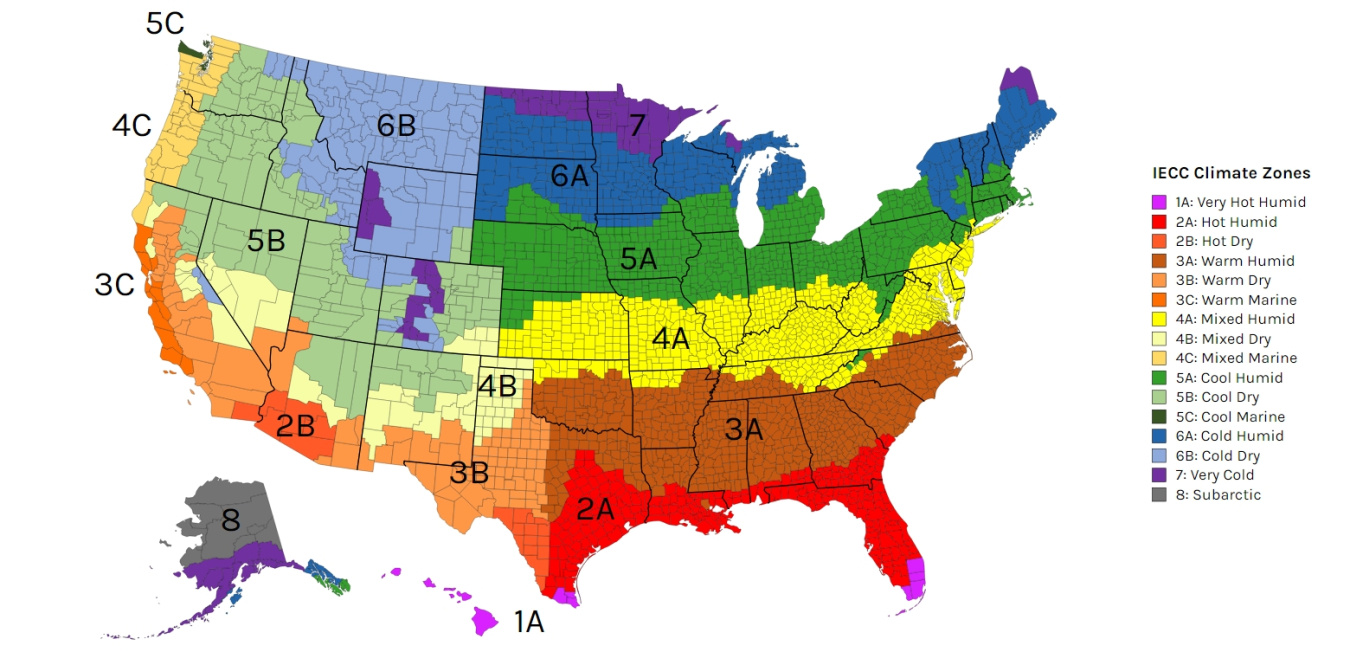
The recommendation follows the selected Batt assembly. Verify locally. DOE guidance
02 / Visualize
Explore how depth, settling, coverage, cost, and climate guidance affect this estimate.
See the installed depth required at each published R-value.
Includes the selected waste factor.
Higher R-values require more bags per 1,000 ft².
Reference for an uninsulated attic. Verify locally. DOE guidance
Relative conductive heat-flow index using 1/R; not a utility-bill forecast.
Whole-bag quantities at common waste allowances.
This calculator is a planning aid, not a product label, installation certificate, engineering review, or code determination. Confirm package coverage, minimum installed weight and thickness, equipment settings, framing and ceiling conditions, and locally adopted requirements before installation.
Select Batt for fiberglass or mineral-wool products installed in framed walls, ceilings, or floors. Add each project section in square feet, subtract doors or other excluded areas, then enter the coverage and weight printed on the package. The realtime estimate returns whole packages, net and waste-adjusted area, total weight, material cost, cavity-fit guidance, and a climate-zone planning target.
Select Blown for loose-fill fiberglass, cellulose, or mineral wool. Enter the net attic area, desired R-value, existing insulation depth and material, and waste allowance. The calculator uses the selected coverage chart to return whole bags, blow-to and settled depth, material weight, added ceiling load, and optional material and labor cost.
Enter square feet directly or use the built-in length × height/width helper. Batt projects can contain multiple sections and separate exclusions.
Choose a manufacturer chart or enter custom bag weight, R-value per inch, settling factor, coverage rows, and package values.
Compare depth, coverage, cost, and climate charts, save the setup as a local preset, and print a clean project report.
The batt calculator totals the net area of every section, applies the selected cutting-waste allowance, divides by the package-label coverage, and rounds up because partial packages cannot normally be purchased. Package weight and optional price are multiplied by the whole-package quantity.
Batt R-value depends on the labeled product and its installed thickness. The cavity-depth visualization is a planning comparison; do not compress a thick batt into a shallow cavity to force a higher labeled R-value.
Existing depth is estimated at R-2.5 per inch for fiberglass or unknown material, R-3.7 per inch for cellulose, and R-3.3 per inch for mineral wool. That estimated existing R-value is subtracted from the target. The engine then selects the first manufacturer coverage row that meets or exceeds the additional R-value and uses its minimum bag rate and published depths.
Always satisfy both the minimum installed thickness and minimum bag count on the product label. The calculator shows the exact chart row used so the estimate can be checked against the bag instructions.
Built-in chart selections cover the following products and applications. Every manufacturer selection can also be opened as a prefilled custom product when a current package label differs from the stored chart.
Coverage charts and product formulations can change. Compare the selected chart with the bag label you are purchasing; use Custom / User Entered when the label values do not match.
R-value measures resistance to heat flow, and higher values provide greater insulating power. The calculator’s location chart uses 2021 IECC planning values published by the U.S. Department of Energy, but local amendments and the complete building assembly can change the requirement. See the DOE insulation and air-sealing guidance.
Manufacturer coverage and R-value information should be checked against the current product fact sheet and bag label. The FTC R-Value Rule (16 CFR Part 460) governs labeling and advertising disclosures for home insulation.
The blown calculator flags loads above USG’s 1.3 lb/ft² sag-prevention recommendation for unsupported insulation over standard 1/2-inch gypsum panels on framing 24 inches on center. That value is not a universal structural or code limit. Verify the actual ceiling board, orientation, framing, fasteners, finish, moisture exposure, manufacturer instructions, and local code.
Bag count depends on net square footage, the selected manufacturer row’s bags-per-1,000-square-feet rate, and waste. The calculator rounds the final purchase quantity up to a whole bag.
Yes. Enter its average depth and material to estimate the existing R-value. The calculator uses only the additional R-value needed to reach the selected target.
Blow-to depth is the initial installed thickness. Settled depth is the expected long-term thickness after settling. Follow the current product label because materials and applications differ.
A coverage chart establishes minimum material quantity and minimum installed thickness for its stated R-value. Meeting only one can leave the assembly below the labeled performance.
Excluded area is subtracted within each section before the cutting-waste percentage is applied. The waste-adjusted net area is divided by package coverage and rounded up.
Yes. Choose Custom / User Entered, or choose the Customize entry beneath a built-in product to prefill its values, then replace them with the current package-label data.
No. Batt and Blown presets are stored as JSON in this browser’s local storage on this device. They can be loaded later and used to generate a printer-friendly project report.
No. Climate targets, cavity guidance, vapor-control notes, and ceiling-load warnings are planning references. Confirm the locally adopted energy and building codes and the complete assembly before installation.
Help others discover useful tools — leave a review on Trustpilot.
